Hi,
Codeigniter is one of the best php frameworks that i have come across in recent times.It strictly follows the MVC architecture and hence uses the Object Oriented Php.
It gives state of the art features with the such ease that you cant stop loving it, even the most novice of developers can work wonders using this framework and cant stop appreciating what he/she has come up with.
Everything that you want your website to exhibit, may it be security(captcha, sql injection,url,etc), utilities(pagination,smiley,download,upload,etc), AJAX, Database and a lot more can be included using this framework with the minimum of efforts and the best possible implementation.
The set up is as easy as it can be, just follow a few simple steps and you are ready to go.(They would come in my next post.)
As the saying goes "The best things in this world are for free!", so is codeigniter.
Simply download it and follow the user guide.
One of the best things bout this framework is that you get a lot of tutorials that would help you out a lot.
Go ahead and start creating some fabulous web applications. :)
Tuesday, February 22, 2011

Wednesday, February 16, 2011
Agile Scout and Smashing Magazine
Smashing Magazine and Agile Scout are the two website that i think every developer should follow, for there are many new and innovative things that one would be exposed to.
Smashing Magazine is the web site that deals with all kind of tools and techniques that one would like to use in their web applications, with detailed and structured articles that would help the most novice of developers to develop their own websites without much effort which would leave them aghast.
Agile Scout will on the other hand guide you through different tools and techniques that would be useful in the development of projects using the agile methodology which is the latest and widely adapted process of developing softwares in the industry today.
I have subscribed to their RSS feeds which are on the right hand side of the blog.
Now go and explore these two web portals and start creating some great web apps. ;)
Smashing Magazine is the web site that deals with all kind of tools and techniques that one would like to use in their web applications, with detailed and structured articles that would help the most novice of developers to develop their own websites without much effort which would leave them aghast.
Agile Scout will on the other hand guide you through different tools and techniques that would be useful in the development of projects using the agile methodology which is the latest and widely adapted process of developing softwares in the industry today.
I have subscribed to their RSS feeds which are on the right hand side of the blog.
Now go and explore these two web portals and start creating some great web apps. ;)
Thursday, January 20, 2011
Mobile Number Protability is Here...:)
Its a great news that the Mobile Number Portability is now effective all over the country,but limited to a particular state,nonetheless now you can change your MSP if you are dissatisfied with the services and don't find it worth spending your hard earned money on it...:)
I have been waiting for this since a loooong time and now that its here i cant wait long to change my MSP.
I guess there would be many out there who share the same views as mine and cant wait long either. well here are a few links that might just help you out.
This is what you need to do.
Simply send an sms from the mobile that you want to port.
PORT <10-digit mobile no that you want to port> and send it to 1900, you'll get a code that you need to give the MSP that you want to port to.
For more information follow these links...
if you wish to move to
till now m able to find only these many links...:(
njoy...;)
Wednesday, January 12, 2011
Recovering your ipod 2g from Jailbreak...
As my previous post talks bout jailbreaking your ipod 2g with iOS 4.0, i have come to realize that its not worth it and if you are reading this post, it means you are also in my support and that has brought you here.
Well its quite easy to un-jailbreak your ipod.Just a few steps that you need to follow.
1. Start itunes on your pc.
2. Plug in your ipod.
3. Press sleep/wake and menu buttons simultaneously until itunes pops a message saying that it has found an ipod in the recovery mode.
4. Recover your ipod by updating it to the latest firmware through itunes.(by pressing the update button on the ipod page in your itunes.)
5. Let itunes do its work now.
6.Your ipod is now unjailbroken and updated to the latest firmware.
7.You would certainly not get the features that you would want from your ipod that jailbroken ipod was providing you with but if you have taken the pain of following the above steps, i guess that you are least concerned bout that. :)
Happy ipod using.
PS : iPod touch 4g is amazing.
Friday, November 5, 2010
TATA DOCOMO INTERNET
Hi,
I just started using the tata docomo internet on my laptop through my nokia phone. Its just amazing. Never thought that a MSP could provide net connection for such cheap rates with great speed.
I am serious, the speed that i experience is no less then a broadband connection, moreover the GPRS plans that it has are really very affordable.
Currently i am using that internet connection only while writing this blog, and not only this blog, along with this i am signed into gmail with a fully loaded msngr, facebook with chat and some other dynamic websites.
I recommend using this internet if you want to get connected anytime anywhere or you have bandwidth issues with your current ISP.
Disclaimer : This is in no way promotion of tata docomo, its solely a personal opinion. I used it and felt like sharing with the community and hence i am doing that.
Njoy...;)
Thursday, November 4, 2010
Jailbreak iPod Touch 2G and iPhone 3G with iOS 4.0
Updated your ipod touch 2nd to the new and free iOS 4.0 promising new and unique features for your ipod just to find out that they are not supported on your device??
I can understand the agitation that you might be undergoing, i also had the same kinda feeling before i jailbroke my ipod.
Its just fantastic and easy too.
Home screen wallpaper, multitasking, battery percentage, etc are all now available for your ipod.
What you need to do is just follow these simple steps.
This jailbreak is also applicable for iPhone 3G
1.Download iOS 4 for your version of iPhone or iPod touch. Download it from here
2. Update your device to the latest firmware using iTunes.
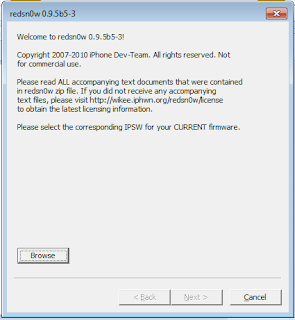
3. Start Redsn0w 0.9.5b5-3, which can be downloaded from links given below.
4. Browse the original iOS 4 firmware file and proceed.
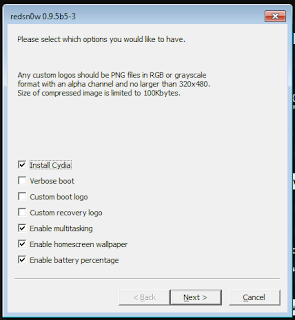
6. Plug in your device, make sure that it is switched off after you plug it in. If its not switched off then hold down the "power" button for a few seconds after you plug in your device until the "switch off" slider comes up on screen. slide to switch off. Now your device is plugged in and switched off.Click "next".
7. Now follow the steps as written in the screen that appears. Be swift in doing that.
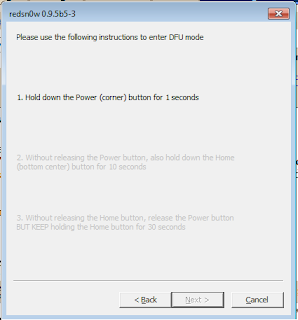
8. Now the application will take care of the jailbreak, you relax, your work is done here.
After a while you'll see that your device reboots and is jailbroken.
Njoy ;)
Wednesday, August 11, 2010
Currency with the new Rupees symbol

Hey folks have a look at this coin, it is one of the first coins to hit the market possessing the new symbol of INR. ;)
Subscribe to:
Posts (Atom)